📞 Call 09 70 44 66 31
⚠️ SEO

The mistakes that are hurting your search rankings

Eleven common mistakes, verifiable in a few clicks on your own site. For each one: how to spot it, and what it costs you.

Most sites that never show up in Google are not suffering from some mysterious ailment. They accumulate ordinary faults, each harmless on its own, which together form a glass ceiling. The good news: these faults can be checked without any paid tool, and fixed without rebuilding the site.

We regularly audit sites belonging to tradespeople, shops and small businesses before proposing a rebuild, and the same causes keep coming back. Here are the eleven most frequent. One useful preliminary: to read a page's code, right-click and choose "View page source", then search with Ctrl + F.

Markup mistakes: what Google reads first

Before judging your content, a search engine reads the tags that announce it. When those are missing or contradictory, everything else suffers for it.

1 Missing or duplicate titles and meta descriptions

The title tag is the clickable line shown in search results; the meta description is the grey text underneath. On many sites, every page carries the same title — the company name.

How to spot it Type site:yoursite.com into Google: you get the list of your indexed pages with their real titles. Duplicates jump straight out.

What it costs you Two pages with the same title compete with each other, and Google rewrites any title it judges inadequate — rarely to your advantage.

2 An inconsistent heading hierarchy

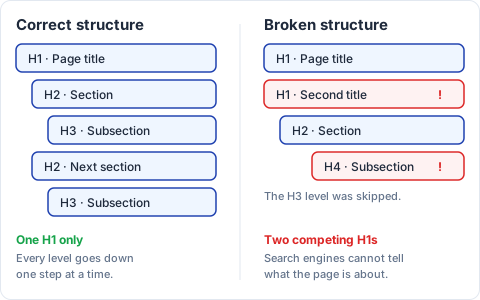
A page is structured like a document: a single H1, then H2s, then H3s inside the H2s. Visual editors often produce the opposite: several H1s, or a jump from H2 to H4 because the font size looked better.

How to spot it In the page source, search for <h1: it should appear only once. Then look for skipped levels.

What it costs you The engine misreads the plan of the page and the relative weight of its sections. Screen readers, which move from heading to heading, lose the thread: it is an accessibility fault too.

On the left, a well structured page: a single H1 for the page title, then H2 section headings and H3 subheadings, each indented one step further. On the right, a badly structured page: two competing H1s, and an H4 placed directly under an H2 while the H3 level is missing.
Every level goes down one step at a time.

3 Images with no alt attribute

The alt attribute describes what the image shows. It is the only thing a search engine or a screen reader perceives of a photo.

How to spot it Search for <img in the page source and check that each one carries a filled-in alt=. Images sent from a phone often keep a file name like "IMG_4712" and no text at all.

What it costs you No visibility in Google Images, a channel that matters for visual trades, and a site that is unusable for people with impaired sight. Describe the image in one natural sentence, without stuffing in keywords.

Structural mistakes: when your pages work against each other

4 Orphan pages

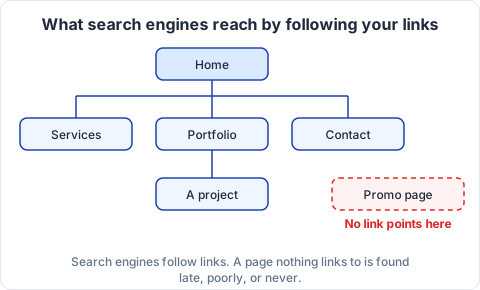
An orphan page is one that no internal link reaches. Its address works, but nothing on the site leads there — the classic case of a page built for a campaign and then forgotten.

How to spot it Start from the home page and try to reach every page by clicking links only. Then compare the result with your sitemap: whatever appears in one and not the other is an orphan.

What it costs you Search engines follow links: a page with no incoming link is found late, poorly or never, and gains no standing from the rest of the site. Careful internal linking is among the most profitable work you can do.

A website structure: from the home page, internal links lead to the Services, Portfolio and Contact pages, and then to a project page. A promo page sits on its own with no incoming link, which makes it practically impossible for search engines to find.
The page on the right displays perfectly: it is simply off the engines' path.

5 Duplicate content across town pages

The signature mistake of tradespeople's sites: duplicating a page and changing only the name of the town. Twenty pages, one text.

How to spot it Copy a whole sentence from one town page and paste it into Google inside quotation marks: if ten of your pages come back, the problem is confirmed.

What it costs you Google generally keeps only one and ignores the rest; the effort is wasted. The remedy is not to delete those pages but to make them genuinely local: the areas you cover, work done there, constraints specific to that town. That is how we build our town-by-town website creation pages.

6 No canonical tag

The same page can often be reached at several addresses: with and without www, with an advertising tracking parameter, with or without a trailing slash. The canonical tag declares which one is authoritative.

How to spot it Search for canonical in the page source: the tag must exist and point to the correct address of that page — not to the home page, a common misconfiguration.

What it costs you The standing you build up is split between competing addresses instead of adding up on a single one.

7 A missing or unsubmitted sitemap

The sitemap is your site's table of contents, written for search engines. Many sites have one without knowing; others have one that is out of date.

How to spot it Open yoursite.com/sitemap.xml in your browser. Then check in Google's Search Console — which is free — that it is declared there and read without errors.

What it costs you On a well-linked ten-page site, the effect is limited; across several hundred pages, a missing table of contents delays the indexing of anything new.

Technical mistakes: the ones your visitors see too

8 A site without HTTPS

HTTPS encrypts what passes between the visitor and your site. The certificate is free with almost every host today.

How to spot it Look at the address bar: a "Not secure" label, or a missing padlock, settles the question in one second.

What it costs you The browser shows a warning, especially off-putting in front of a contact form. Google also confirmed as far back as 2014 that HTTPS was a ranking signal.

9 A site that is unreadable on mobile

A responsive site adapts its layout to the width of the screen. Without that, the visitor has to zoom, drag sideways, and aim at tiny buttons.

How to spot it Open your site on your own phone and try to fill in the contact form. Watch for text that is too small, buttons pressed together, and tables that overflow.

What it costs you Google indexes the mobile version first: what the phone sees is what gets assessed. And most local searches start on a mobile, often to place a call.

10 A slow loading time

Slowness works against you twice: it drives visitors away, and it weighs on your ranking through the Core Web Vitals.

How to spot it Run your home page through PageSpeed Insights, on the mobile tab, and note both the score and the three indicators shown.

What it costs you A rising bounce rate and falling conversions. The subject, its thresholds and its remedies are covered in our article on why website speed matters for your business.

11 No structured data

Structured data in the Schema.org format is invisible markup that states in black and white: this is a local business, here is its address, its opening hours, its services, its reviews.

How to spot it Search for application/ld+json in the page source, or run the address through Google's rich results test.

What it costs you No rich display in the results — opening hours, stars, frequently asked questions — even though those take up more room and catch the eye. You can see the effect on the sites we have built.

Where should you start?

Eleven points can feel discouraging. In practice, this order gives the best return on effort:

  1. HTTPS and mobile display, because they block visitors and search engines alike. Nothing else helps until they are sorted.
  2. Titles and meta descriptions, page by page: the best effort-to-result ratio in search engine optimisation, and no technical skill required.
  3. Duplicate content and orphan pages: writing work, but it unlocks whole pages that are invisible today.
  4. Speed, structured data and the sitemap, which belong to how the site is built rather than to what it says.

While you are at it, create a Search Console account: it is free, and it tells you which pages Google has indexed, which searches you appear for, and what errors it runs into. If those four steps mean dismantling a site built on shaky foundations, a rebuild often costs less than the repair: our plans and prices are public.

In short

None of these eleven mistakes is black magic, and half can be checked by reading the source of your home page. They share one trait: they stop Google from understanding what you do and who you do it for. Fix them in order, one a week if need be — this is maintenance work, not a one-off project.

How many of these are on your site?

Send us the address: we will reply with the list of things to fix, in plain words and with no commitment.

Request my free audit